
When you are an Android user, to be able to use the app optimally, it is important that you do not close the app, and that Android itself does not close the app automatically. We will show you below how you can easily arrange this.
When you use an ANDROID phone for Thrivey, check the following list:
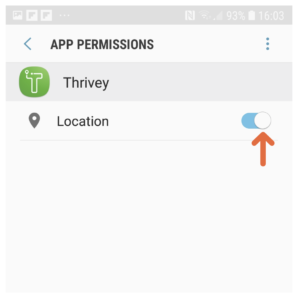
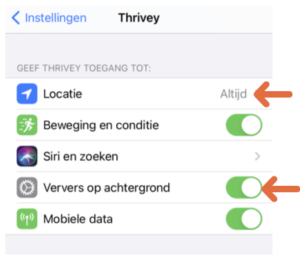
- Make sure the location tracking for Thrivey is set to ‘always’.
- If you reinstall the app, for example on a new phone, you will have to give permission again to register your location. Give this permission.
- Do not quit the app yourself. (See below)
- Make sure Android doesn’t quit the app for you automatically. (See below)
Do not quit the app
If you quit Thrivey, by dragging the app up on your phone, the location tracking will be temporarily turned off. The app will typically be restarted, however, we have experienced that with some users this is not always the case. So do not quit the app. Or if you quit all your apps, remember to restart Thrivey.
Stop Android from automatically turning off the app
Android phones turn off apps like Thrivey to save the phone’s battery. This happens automatically. Unfortunately, there is nothing we can do about this. In this instance the app can no longer keep track of routes for you. Different suppliers of Android phones (for example Samsung, Sony, or Nokia) have different ways of optimising the battery of your phone. The organisation www.dontkillmyapp.com has worked out for the various suppliers how to turn these functions off. Below are the steps you need to take for each supplier:
- Samsung
- OnePlus
- Huawei
- Xiaomi
- Meizu
- Asus
- Wiko
- Lenovo
- Oppo
- Vivo
- Realme
- Blackview
- Sony
- Unihertz
- AOSP
- Nokia
- HTC
- Other suppliers
With Thrivey, the kilometre registration app that automatically recognises your chosen means of transportation, you can keep track of your kilometres easily. Declare your tax kilometres without a fuss!