
It is possible that for your kilometer registration you have to distinguish between commute and business trip kilometers. Thrivey can do this for you automatically. How Thrivey calculates this and how you can set this up is described in this tutorial. But first we start with some definitions.
What is Commuting, what are Business trips and what is the Workplace?
Commuting: By ‘commuting’ we mean traveling back and forth from your place of residence (=your home location) to a fixed or changing workplace. Do you, or do your employees have an employment contract that does not contain a permanent work address? If so, all journeys from your place of residence to a business address count as commuting. (Source: www.belastingdienst.nl)
Business trips: A business trip is a business trip that you make because your employer considers it necessary. You make a business trip to a place other than your workplace. (Source: https://www.p-direkt.nl/informatie-rijksbedrijven-2020/financien/fees-en-toelagen/binnenlandse-dienstreis)
Workplace: Your daily work location, for example the office of your employer. (In dutch this is called Standplaats.)
Examples and explanation
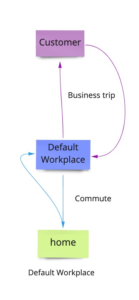
1: If you travel from your home location to your workplace and back again, those kilometres count as commuter kilometres. If you go from your workplace to a customer, or to another business location and back, this counts as a business trip.
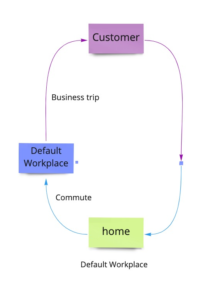
2: If you travel from your home location to a customer, via your workplace, and you travel directly back home from that customer, the kilometres to your workplace will count as commuter traffic. The kilometres of that journey to the customer will count as business kilometres.
The kilometres you make from the customer to your home location are divided up: The same distance that you traveled from home to your workplace counts towards the commute part. The remaining distance counts towards the business trip part.
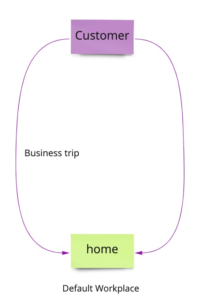
3: Sometimes you travel directly to a customer without first going to your workplace. All kilometres from your home location to the customers location and back are calculated and stored as business trips.
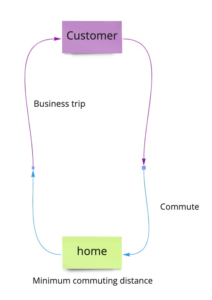
4: You can also set that the first kilometres of your business trip are always counted as commuting kilometres. This can be useful if, for example, your employer pays you for these kilometers by default. To prevent you from being paid twice for the same kilometres, you can set a minimum number of commuting kilometres yourself in the app. In practical terms this works the same as with picture 2, only you don’t travel to your workplace first.
Setting up your commutes and your business journeys in Thrivey
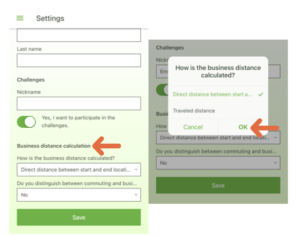
5 and 6: Go to ‘Settings’ in the app. In the second bar under ‘Business distance calculation’ you can select whether you want the app to calculate the direct distance or the traveled distance for your business trips.
Distinguishing between commuting and business trips
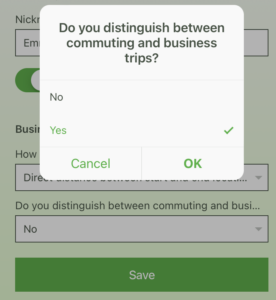
7: To distinguish between commuting and business trips, go to Settings in the app. Below the ‘Business distance calculation’ bar you will see ‘Distinction between commuting and business trips’. Check Yes to distinguish between commuting and business trips. Below this, under ‘Minimum commuting kilometres’, you can set yourself how many kilometres you always want to count as commuting.
Setting up your Worklocation
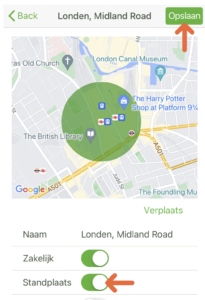
8: In the app, go to ‘Locations’ and press the location that should become your permanent worklocation. In the screen you can check this location as Worklocation (in dutch this is called Standplaats).
Thrivey, the kilometre registration app, offers you, your employer or your accountant several useful options to easily keep track of your kilometre registration and administration.