
In this blog we explain how Thrivey calculates the business kilometres of your journeys. Thrivey keeps track of all the journeys you make. Some of these journeys are business trips, and others are private trips. We explain how Thrivey calculates which kilometres are business kilometres and which ones count as private kilometres. Below you will find some typical examples of business journeys, the calculation methodes, and which options you have for setting things up in the app.
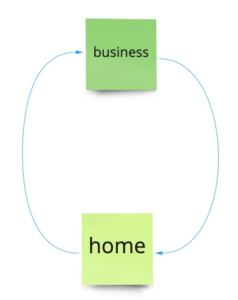
Image 1: Travelling from your home location to your business location and back again: The kilometres you have traveled are stored in your declaration list as business kilometres.
In the app you can set the locations you have travelled to as business locations. When you do this, the app will always calculate your kilometres to and from that location as business kilometers. But if you travel to a private location in between, private kilometers will be added for that trip. Thrivey calculates these distances for you.
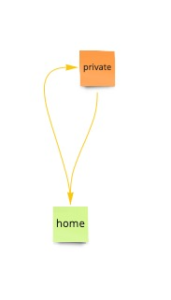
Image 2: When you travel from your home location to a private location: The kilometres you have traveled are stored in your declaration list as private kilometres.
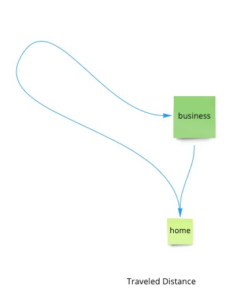
Image 3: When you travel via a detour from your home location to your business location, and back again: You can set up your business distance calculation in such a way that the actual traveled distance is calculated, see below. The kilometres you have traveled, including the detour you made, are stored in your declaration list as business kilometers.
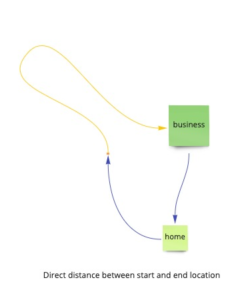
Image 4: When you take a detour from your home location to your business location and back again: You have selected the business distance calculator to calculate the ‘direct distance between start and end location’. The shortest distance -as indicated in Google maps- will be stored in your declaration list as business kilometres. Thus, the detour kilometres are not added. Instead, they are included in your private kilometer list.
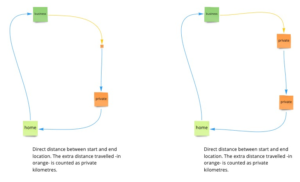
Image 5: When you go to your business location from a private location, the app calculates for you how many business kilometres you have traveled. The app waits until your journey is over, and then calculates how many kilometres you have traveled privately. The private kilometres are deducted from the business kilometres. For business trips with a with a private stopover, the app will always calculate the direct route.
How do you set this up?
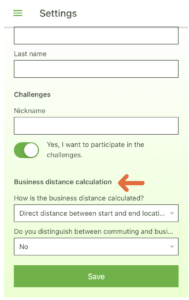 Go to Settings in the app. In the window you can choose under ‘Business distance calculation’ how the distance of your trip is calculated. (Image 6). You can select ‘The direct distance from your starting location to your work location’. This means that Thrivey tracks and saves the direct route, in kilometres, to and from your business location, without a detour.
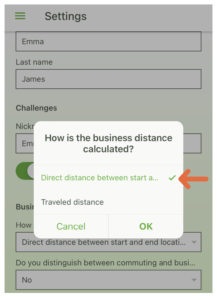
If you select the ‘Traveled distance‘ option (Image 7), the app will register the entire road you have traveled.
Thrivey is the kilometre registration app that takes care of your administration as much as possible for you and your employees. Thrivey calculates all your routes, saves the data, and makes an overview of all your traveled kilometres: for your administration or your tax return.